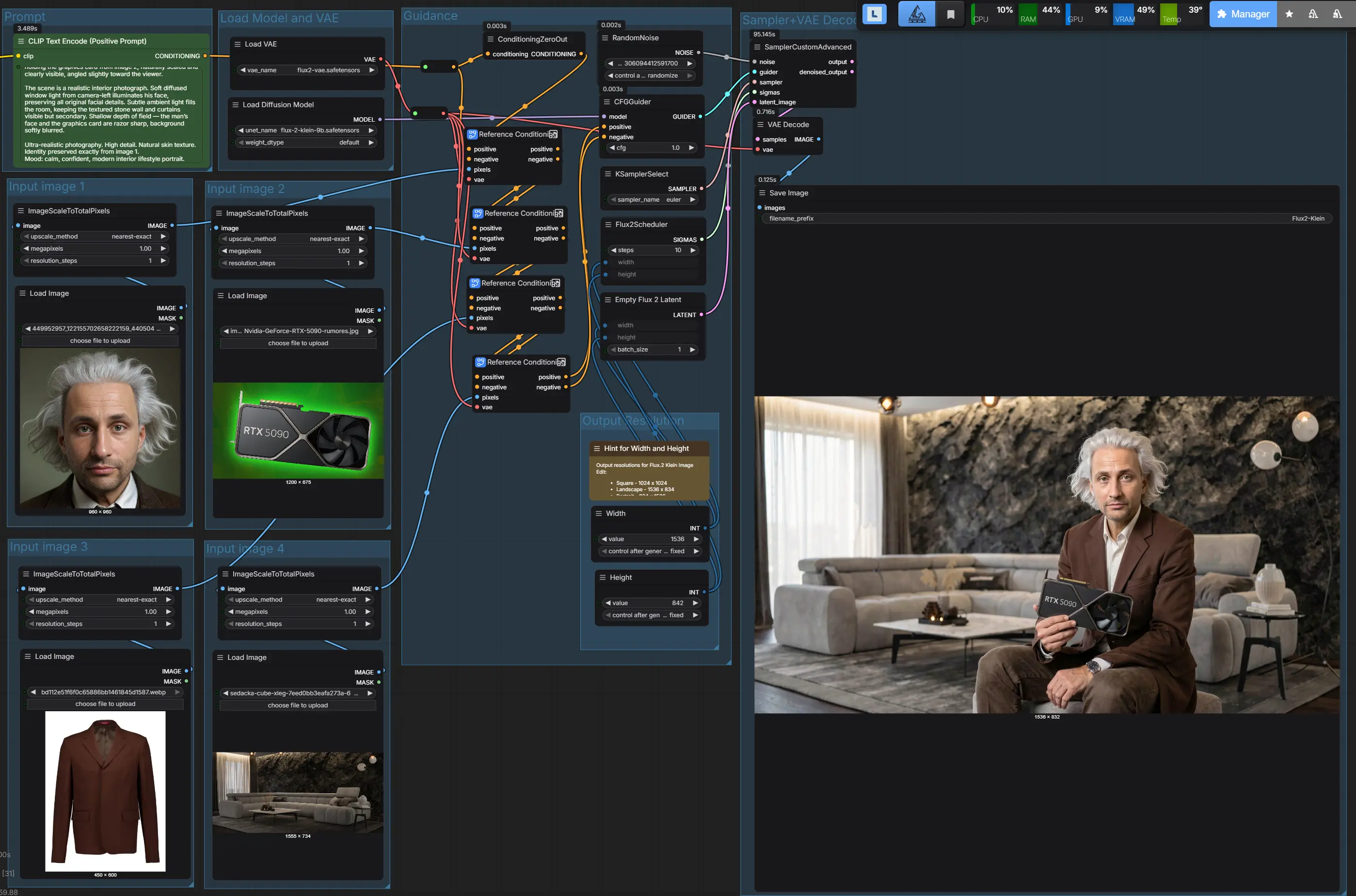
🧠 Multi-Reference Workflow in ComfyUI
How to combine 4 images into one perfectly consistent shot
ComfyUI workflows are pushing generative AI from experimentation into real production. One of them is the multi-reference workflow for FLUX.2 [Klein], which can merge four separate images into a single result that looks like one authentic photograph.
This is not a collage or traditional image-to-image. It is guided synthesis, where each input image contributes a specific part of reality.
🎯 What the workflow can do
The workflow allows combining, for example:
- a person’s identity from the first image
- a product or object from the second
- clothing or materials from the third
- the environment from the fourth
The model converts these references into latent space and uses them simultaneously during generation. The result is an image that preserves proportions, details, and style from all sources.
This makes it possible to create a scene that never existed, yet looks completely real.
⚙️ How the workflow works
Technically, it is a chaining of reference conditionings:
- each input image is encoded into latent space using a VAE
- the latent is combined with a text prompt
- references are stacked sequentially
- the sampler generates a new image influenced by all references at once
The FLUX.2 Klein model ensures that individual references do not overwrite each other but complement one another. The result is a stable composition without identity or object distortion.
🧩 Why it matters
This approach solves one of the biggest problems in generative graphics: how to merge multiple sources into one scene without losing consistency.
The workflow is ideal for:
- product visualizations
- advertising materials
- fashion compositions
- archviz scenes with characters
- AI photomontages without manual compositing
Instead of time-consuming assembly in Photoshop, the scene can be generated directly.
🚀 Practical use
Typical scenario: a person from a reference photo sits in a specific interior, wears precisely defined clothing, and holds a specific product — everything matches the original sources.
A similar result can now also be achieved by Nano Banana, but that is a cloud solution. FLUX.2 Klein, in contrast, runs completely locally in ComfyUI, with no fees and no need to send data outside your computer.
📦 Workflow for ComfyUI
The workflow is ready for import into ComfyUI and can be easily customized by swapping the input images.